F jumpthrow⇧F medium⌥F lobM targetN aimP copy posH hide instructionsB replay my throwL save lineupV noclipC clearR next spawnT retry throwESC menu
SMOKE CAM
✕ SMOKE CAM
LINEUP
WASDJUMPCROUCHWALK
DAILY CHALLENGEFive smokes, the same five for everyone today. Watch, then land them.three tries each · no markers · about 2 minutesENTER
Add to Home Screen
opens without Safari's bars, and plays with no signal
PROFILE
—
utility rating
Utility rating: 70% how often you land what you throw,
30% how much of each map you have covered. Maps with fewer than five throws
do not count towards it.
Play a scored run and this fills in.
BY MAP
WHAT TO LEARN NEXT
PLAY HISTORY
Stored in this browser only
Clear your site data, or open SMOKEPRACTICE on your phone, and none of
this is there. Sign in with Steam and it stays yours across devices — and
it is what a shared profile will be built on.
FIRST SIGN-IN
Bring your progress with you?
Bring it in
It becomes your account's history. From then on every scored run
is added as you play, on any device you sign in on.
Start fresh
Nothing from this browser joins the account. Runs you play from
now on still count — only the past stays behind.
Asked once, at your first sign-in. Nothing is deleted either
way — whatever this browser has, it keeps.
YOUR SETTINGS
Kept in this browser and used on every map. Nothing here needs a
map loaded, so it can all be set now — paste a crosshair, move the keys, and the
first round is played with your own hands.
CHALLENGE1 / 50.0s
LAND A SMOKE ONA site CT
watch it as many times as you need
CHALLENGEDE_MIRAGE5 smokes · no markers · three tries each
Five lineups, drawn at random from this map —
one at a time. Each one plays for you first: where he stands, what
he aims at, where it lands. Watch it as many times as you need, then
I'M READY hands you the grenade — three tries, land it in
the orange ring. Then the next one.
A set, thrown in this order, on one clock — one at a time.
Each one plays for you, you watch it as long as you like, then it is your
throw. The same lineups come up every run, so this is where a streak gets
to three in a row and they turn to MASTERED.
CHALLENGESMOKE 1 / 5
Lineup 4
GO TO THE RING
LEARNINGA Execute1 / 6
Stairs From A Rampland it and the set moves on — no clock, as many goes as you want
LEARN A SET
Walked one throw at a time with every marker on and no
clock. Land one and it moves itself along.
No sets for that side on this map.
SET LEARNED
A Execute
You put every throw where it belongs. The run is
the same set with the rings off and a clock going.
STAND HERE
TARGET
PASS
CHALLENGE
4 / 5
in 1:52 · best 3 / 5
AIM HERE
scroll or ‹ › · TAB reopens it later
TRAINING
SMOKE1 2 3 — switch
▶ PREVIEW — MOVE TO TAKE OVER
PREVIEWLINEUP0.00s
Move to take over — he keeps throwing in the corner
AUGUST 2026
EXECUTES
Whole sets, thrown from one spot, on a clock.
WHAT'S NEW
WHAT'S COMING
Your utility in the app. Throw one, press save, send
it in — community lineups and community executes, credited to whoever worked
them out.
A faster first load. The map is the reason people
leave before they have thrown anything, and it is the next thing being cut.
A leaderboard, once the accounts have something in
them. Only runs played signed in will count on it — an imported number
from somebody's own browser is not a result anybody can stand behind.
Later, and paid: a history of every run so you can see
a set getting faster, practice that picks what you keep missing instead of what
you already have, and a coach that reads your throws back to you. The trainer
itself is not going behind it.
Still not finished, and worth saying: the physics is fitted against pro
demos — close, not identical — and some of the imported lineups land off, mostly
outside Mirage and Dust2. If you find one, tell us on Discord and it gets
re-thrown.
CHANGELOG
Everything that has changed, newest first. What is coming next is
not here on purpose — it belongs in a promise, not in a log.
HOW IT WORKS
Real CS2 maps and the real grenade physics, all of it from
right here. Nothing to install and no game needed. Everything below is free
and everything you do is saved on this device.
WHAT YOU ARE LOOKING AT — the real thing, not mock-ups
smokepractice.com
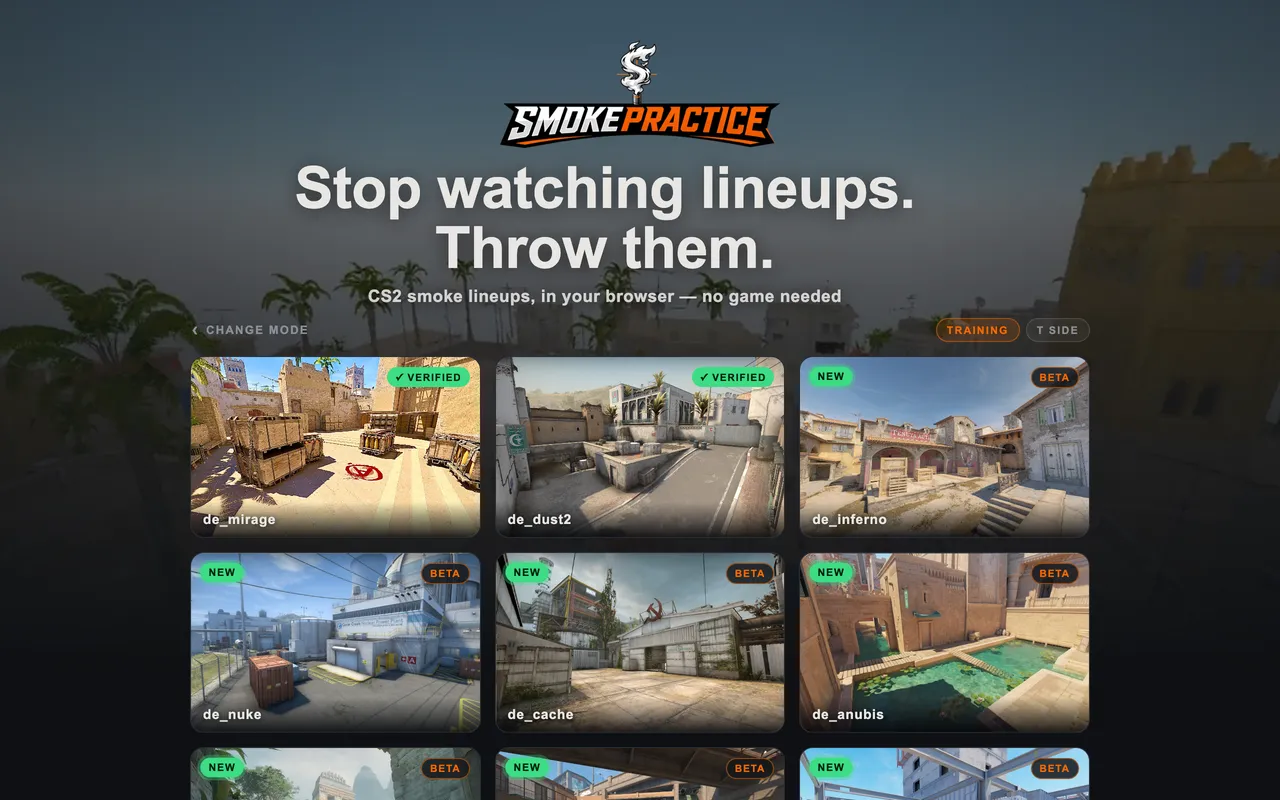
Nine maps, no download. Mirage and Dust2 are
checked against pro demos; the rest are real geometry while their lineups
are calibrated.
smokepractice.com/mirage
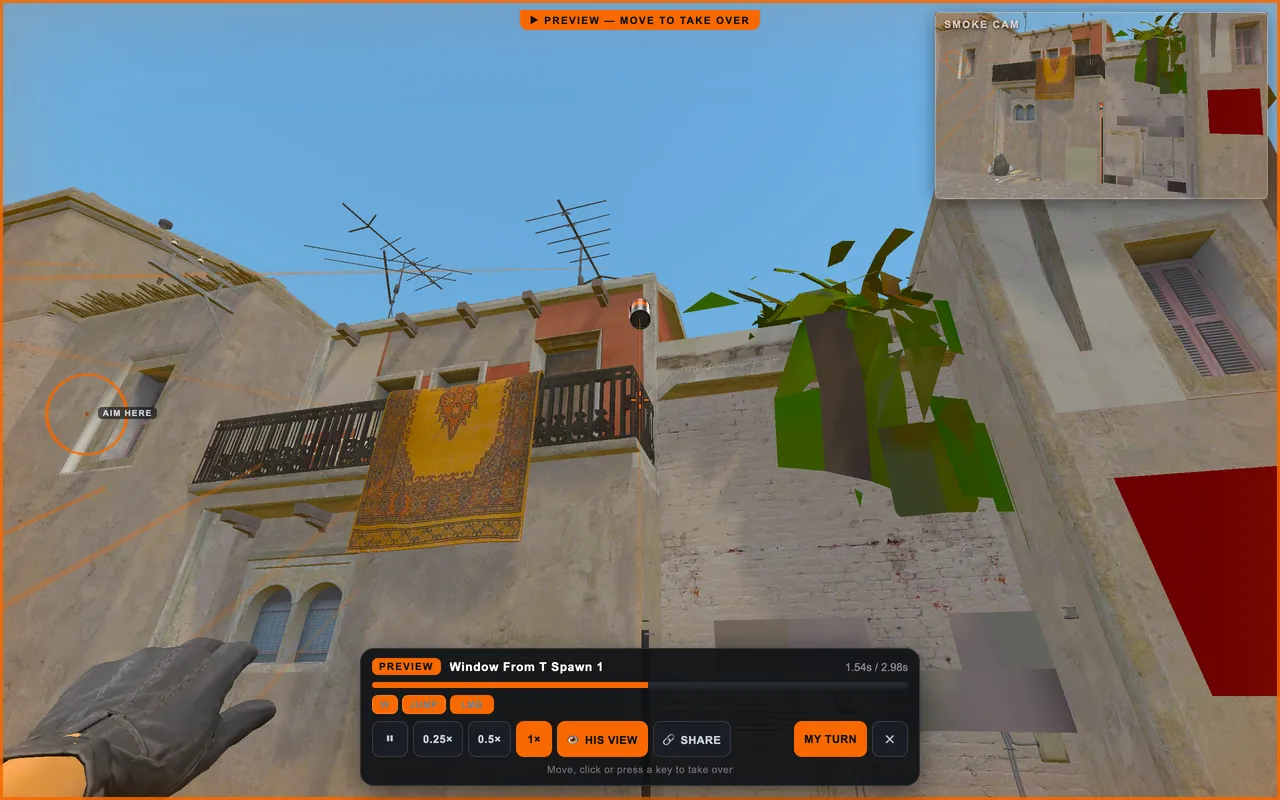
Watch it, then take it over. Where he stood,
what he lined up on, which keys he held — at quarter speed if you want it.
Then MY TURN and it is your throw.
smokepractice.com/mirage
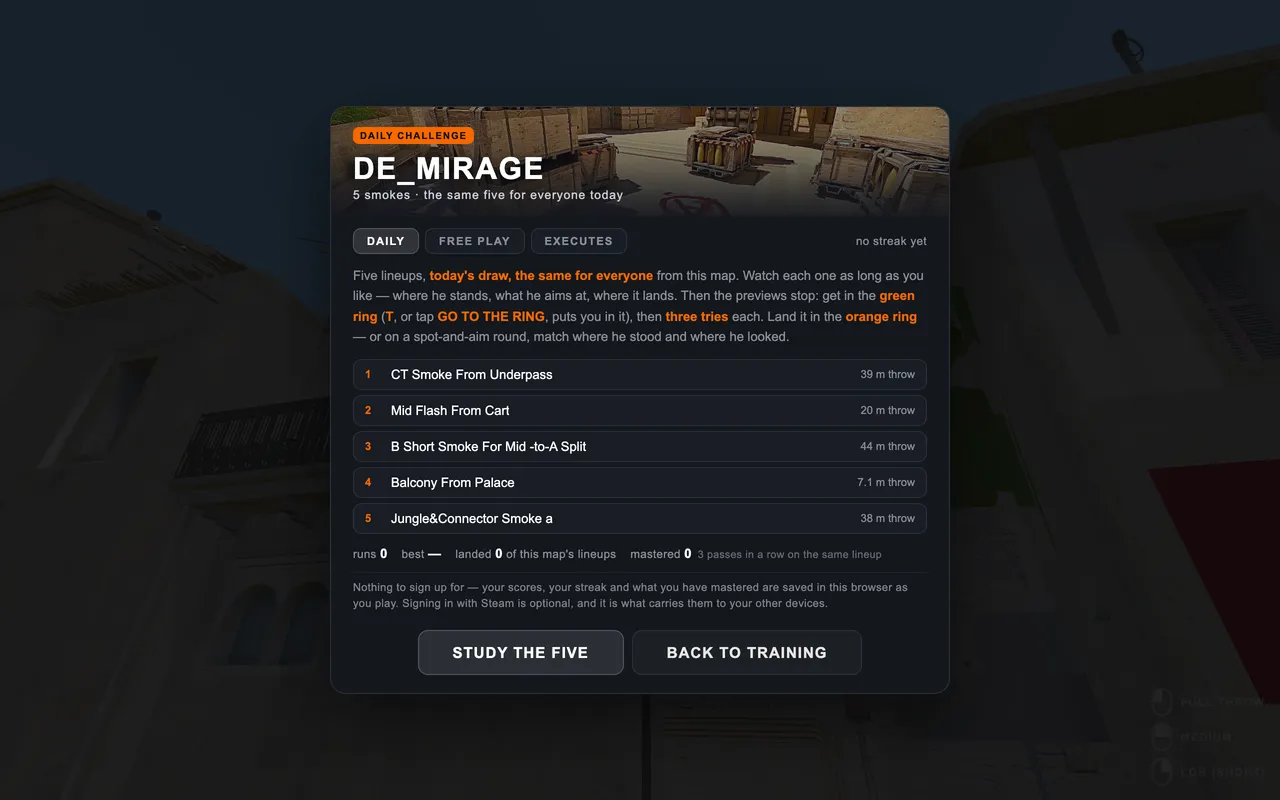
Five a day, the same five for everyone. Three
tries each, scored on where the smoke actually lands. Nothing to sign up
for.
THE THREE MODES — the pills on the landing, or ESC while playing
FREESTYLEAn empty map. Throw whatever you
like, wherever you like. Nothing is marked and nothing is scored.
TRAININGEvery recorded lineup on the map
gets a beacon. Walk into one and it tells you where to stand, where to aim
and what to throw — then says whether you landed it. This is where you learn.
CHALLENGEThe markers come off and a clock
starts. Five lineups, three tries each. This is where you find out. There is a new
five every day, the same five for everyone, and coming back on consecutive days
builds a streak.
SAVINGNothing to sign up for. Your best
score, your streak, which lineups you have landed and which you have mastered are
saved in this browser — so a different browser, or clearing site data, starts
over.
YOUR FIRST SMOKE — about thirty seconds
1Pick a map. MIRAGE and DUST2 are the two
whose physics are checked against pro demos.
2Stay in TRAINING and walk to any orange beacon.
You get pulled onto the exact spot as you arrive.
3Put your crosshair on the AIM HERE dot. It turns
green when you are on it.
4Hold left click and let go. If the
recipe says JUMPTHROW, press F instead.Tap
THROW. If the recipe says JUMPTHROW, hold THROW and tap JT.
5The smoke cam follows it down. You get
LANDED with how far from centre, or MISSED with what went wrong.
Throw it again — there is no limit and no clock here.
LEARN A SET — an execute, one throw at a time
WHYNobody remembers "smoke number seven".
People remember taking A. A set is three to seven pieces of utility thrown in
order from one place — smokes to blind the site, a molotov on the corner someone
sits in, the flash last.
1In TRAINING, press ESC and find
LEARN A SET.
2Pick one and press WALK IT. You are put on the
first throw's spot and only its beacon is lit.
3Land it and the set moves itself on. No clock, as many
goes as you want. Miss and nothing happens — throw again.
4When the last one lands it offers to run the whole set
against the clock. That is the same set in CHALLENGE, with the rings off.
GETTING GOOD AT IT — what the app keeps
MASTEREDA lineup counts as mastered after
three passes in a row on that same lineup — not three ever, because one hit in
five is luck. The number on each map card is how many you have.
RETRYEvery run ends with
THROW THE ONES YOU MISSED. Sixty seconds on exactly what went wrong, and the
only realistic way to get three in a row on the same lineup.
DRILLOnce you have some history the intro
card offers DRILL MY MISSES — a run built from the lineups you fail most
often, worst first.
DAILYFive lineups drawn from the date, the
same for everybody that day, with a streak for coming back.
WORTH KNOWING
TPuts you on the spot if you
wander off it during a run.
RINGPuts you on the spot if
you wander off it during a run.
SPOT & AIMAbout a quarter of lineups
came from a source that published where to stand and where to look but not the
flight. Those rounds are scored on your stance and angle instead of where the smoke
lands, and they say so on the card.
VERIFIEDMirage and Dust2 carry the
badge: their physics is checked against pro demos and their spawns and collision
are walked. The other seven have the same real geometry and the same physics —
they have not been through that pass, so a lineup can land off.
Every key and button is listed under CONTROLS.
CONTROLS
THROWING
LMBfull throw (left click)
RMBlob — the short right-click throw
LMB+RMBmedium throw (hold both, release)
Fjumpthrow bind — full throw, exactly like a CS2 bind
SHIFT+Fmedium jumpthrow (only while standing still — moving throws stay FULL, like in game)
ALT+Flob jumpthrow
1 2 3smoke / flash / molotov — in TRAINING the beacons follow what you hold
4cycle through the three (SHIFT+4 goes back)
0show every lineup's beacon at once, instead of only the one in your hand
SCROLLtwo thirds of lineups share a spot — the wheel picks between the ones under your feet
TABreopen the picker for the spot you are standing on
MOVEMENT
W A S Dmove
SHIFTwalk (silent, slower)
CTRLcrouch
SPACEjump
Vnoclip — fly through the map
PRACTICE TOOLS
Rrespawn on the NEXT spawn slot — cycles all real match spawns (pick one from the map in the pause menu)
Tteleport back to the exact spot + aim of your last throw
Lsave the throw — on a lineup you are standing on this REWRITES it (keeps its name, URL and credit); SHIFT+L always saves a new one
Cclear all smokes and trails
Pcopy your position as a CS2 setpos — works in the game console too
ZOOM SCOPEhold a throw button and a corner scope magnifies 5× down your crosshair for fine aiming — then shows the smoke land
Mmark the spot you're aiming at as a target
Nauto-aim a throw at the target from where you stand (SHIFT = medium, ALT = lob)
SMOKE CAMafter every throw a cam follows the smoke — corner window or fullscreen chase (✕ to exit), pick in the pause menu
ESCpause menu — sensitivity, smoke cam, spawns, teleport, saved lineups
MOVING & LOOKING
▲▼◀▶move — slide your finger for diagonals
right sidedrag to look around
THROWING
THROWfull throw
MEDmedium throw
LOBshort throw
JTjumpthrow bind (full)
hold MED/LOB + tap JTmedium / lob jumpthrow — keep the button held, tap JT with another finger
jump + THROWmanual jumpthrow
AFTER THE THROW
SMOKE CAMa cam follows your smoke after the throw — fullscreen (tap ✕ to return) or a corner window, pick in the ☰ menu
RETRYteleport back to the exact spot + aim of your last throw
SPAWNrespawn on the NEXT spawn slot — cycles all real match spawns (pick one from the map in the pause menu)
SAVEsave your last throw as a lineup
CLEARclear all smokes and trails
NOCLIPfly through the map
☰pause menu — sensitivity, spawns, teleport, saved lineups
FULL THROW
MEDIUM
LOB (SHORT)
Practise CS2 smokes without opening the game.
✕THE OLD WAYLOOK IT UPthenTHE GAME
Find the lineup — a video, a guide, wherever
Open the game, load a practice map
Walk to the spot from memory
Go back, check, do it again
Two places, and the throwing comes last.
SMOKEPRACTICEALL OF IT HERE · PHONE TOO
Pick a map — it opens straight away
Watch the throw, then throw it yourself
A real smoke, real physics, scored where it lands
One place — and it remembers every one you land.
📌LINEUPMirage
EARLY BIRD · FIRST 100Early enough that you can still change it.
Say a lineup lands wrong — it gets fixed that week.
The first hundred keep the Early Bird role; it follows you onto your account when accounts land.
No paywall, no tier. It just says you were here for this part.
Step through an execute with every marker on and
no clock — then run it for time in CHALLENGE.
SIDE
🎯 INSTANT SMOKE? PICK YOUR SPAWN
An instant smoke only lands right from the exact spawn slot — click the player you want to start as.
SENSITIVITY
The same number as your CS2 sensitivity — the app converts it the
way the game does, so muscle memory carries across.
SMOKE CAM
After every throw a camera follows your smoke to where it lands.
FULLSCREEN
Firefox keeps a "has control of your pointer" bar on
screen whenever a page holds the mouse — it is browser security and no page can turn
it off. Fullscreen is the one place it does not appear, and it matches the game.
CROSSHAIR
A share code works — your own from the game's crosshair
screen, or a pro's from any settings site. So does the raw block: developer 1
then cl_crosshair in the CS2 console prints every one of these. The long
lines that appear while a throw is held take the colour and keep their shape.
Style and the dynamic settings are ignored — this app has no weapon spread,
so there is nothing for them to do.
VIEWMODEL
Move the hands out of the corner, or push them away. SIZE
moves the rig rather than changing its field of view — it reads the same to the eye,
but it is not the same maths, so it is not called FOV. A true
viewmodel_fov and cl_righthand need the arms drawn in their own pass;
they are not here yet.
CONTROLS
Click a key, then press the one you want. ESC keeps what was
there. A key can only do one thing, so taking it leaves its old action with none —
the panel says which.
SAVED LINEUPS
L re-records the PREVIEW of the lineup you are on — its spot,
aim and strength are not touched.
CTRL+L replaces that lineup entirely: spot, aim, strength and
preview, keeping only its name and link.
SHIFT+L saves a new lineup of your own.
📍 POSITION — COPY YOURS, OR PASTE ONE TO TELEPORT
setpos …
The same string works in the CS2 console too — and P copies it mid-game.
WASD move SHIFT walk CTRL crouch SPACE jump LMB full RMB lob LMB+RMB or SHIFT+LMB medium ALT+LMB lob F = jumpthrow (SHIFT/ALT picks type while standing — moving always throws FULL)
thrown nades leave a trailP copy your position V noclip (fly) C clear smokes+trails R cycle the REAL match spawns (practice instant smokes from every slot) T teleport back to your last throw spot
W A S D (bottom-left) move CROUCH / WALK toggle and stay on
drag the right side of the screen to look around THROW full MED medium LOB short JT jumpthrow jump + click = manual jumpthrow CLEAR smokes+trails NOCLIP fly through the map SPAWN cycle match spawns RETRY back to last throw SAVE lineup ☰ pause
EARLY BIRD · FIRST 100Did a lineup land wrong?Say so in the Discord and it gets fixed — usually the same
week. The first hundred in keep the Early Bird role.
 Add to Home Screen
opens without Safari's bars, and plays with no signal
Add to Home Screen
opens without Safari's bars, and plays with no signal

 FACEIT CheckMate — also ours
When FACEIT bans someone you reported, it finds the match you
played against them in one click — so you can make the case for your
ELO back. 105+ using it.
FACEIT CheckMate — also ours
When FACEIT bans someone you reported, it finds the match you
played against them in one click — so you can make the case for your
ELO back. 105+ using it.